I deployed MagicMakeup on an RTX 4090 and ran fifteen real image-to-image makeup-transfer cases before writing this review. This MagicMakeup setup covered nine full-face transfers, three eye-only transfers, and three lip-only transfers. It is an AI makeup transfer workflow, not a prompt-only image generator. Every case produced an output, but the run also exposed a practical trap: a branch can be labelled eyes or lip while still receiving a full-face mask if the input paths are wired incorrectly. I corrected that mapping and reran the local branches before judging them.
My short verdict is straightforward. MagicMakeup is a serious research model for high-fidelity makeup transfer, especially when regional control matters more than interactive speed. It preserves the source portrait convincingly in the tested examples and makes the mask-driven workflow explicit. The cost is substantial: on my 4090, a 1024×1024 image took about 112 seconds, peak GPU memory reached 48,493 MiB out of 49,140 MiB, and the project needs a large base model, a MagicMakeup checkpoint, a SigLIP dependency, and carefully matched masks. I would use it for offline batch processing, visual research, and controlled asset generation. I would not present this configuration as a real-time consumer filter or as a ready-made multi-user service.
The project is from vivo Camera Research and Zhejiang University. The official repository currently describes it as “[ECCV 2026] MagicMakeup: A Region-Controllable Diffusion Transformer for High-Fidelity Makeup-Transfer.” The paper was first submitted to arXiv on July 23, 2026. The official project page identifies the State Key Lab of CAD&CG at Zhejiang University and vivo’s BlueImage Lab as the research affiliations. Those are the project’s own publication and affiliation claims; the performance numbers below are my measurements.
What MagicMakeup is trying to solve
Traditional makeup transfer often makes a trade-off between two goals. It can preserve the person’s identity and head pose, or it can copy the reference makeup strongly, but doing both consistently is difficult. A full-face transfer can also be too blunt for practical editing. A user may want to borrow only an eye-shadow pattern, only a lip color, or a coordinated combination of several regions.
MagicMakeup is designed around that problem. The repository presents a region-controllable diffusion transformer that can perform full-face transfer as well as localized eyes and lip transfer. Its method description highlights a Target-Aware Reference Guidance module, or TARG, and a Cross-Model Prompt Guidance module, or CMPG. The paper also introduces high-resolution makeup data and the MakeupHQ Bench. The official project page describes the benchmark as 6,772 identity-consistent, region-labelled pairs at 1024×1024 resolution, with synthetic and real subsets.
From an operator’s perspective, the important detail is not the acronym list. It is the data contract. A run needs a source image, a reference makeup image, a source mask, a reference mask, and a region label. The official examples use eyes, lip, and eyes,lip,face. The repository also documents a directory convention in which face masks use the base filename while eye and lip masks use a _mask suffix. This is exactly the kind of small convention that can determine whether a regional experiment is meaningful.
The model is built on FLUX.1-Kontext-dev and applies the MagicMakeup checkpoint from the Anyou/MagicMakeup model repository. That gives the project a modern diffusion-transformer base, but it also explains why the practical footprint is much larger than an old, small image-editing checkpoint. The official README recommends model offload and mentions sequential offload for machines with less memory.
My test design
I kept the evaluation intentionally narrow and repeatable instead of mixing many uncontrolled prompts into one score. The input images came from the repository’s example structure. Each case used a 1024×1024 output, guidance scale 2.5, 28 diffusion steps, and model_offload.
The fifteen cases were organized as follows:
Cases | Branch | Source/reference pairs | Label | Mask used after correction | Purpose |
|---|---|---|---|---|---|
1–9 | Full face | 3×3 |
|
| Cross-source and cross-reference makeup transfer |
10–12 | Eyes only | 0001/0002, 0002/0002, 0003/0002 |
|
| Transfer eye makeup without asking for a full-face edit |
13–15 | Lip only | 0001/0003, 0002/0003, 0003/0003 |
|
| Transfer lip makeup with the rest of the face constrained |
The acceptance rule was simple: the command had to finish, save a generated JPEG, and save a readable evidence panel. All fifteen jobs completed successfully. That is a 15/15 completion rate for this small fixed suite. It is not a claim that every arbitrary portrait will work; it is a statement about the supplied test set and this configuration.
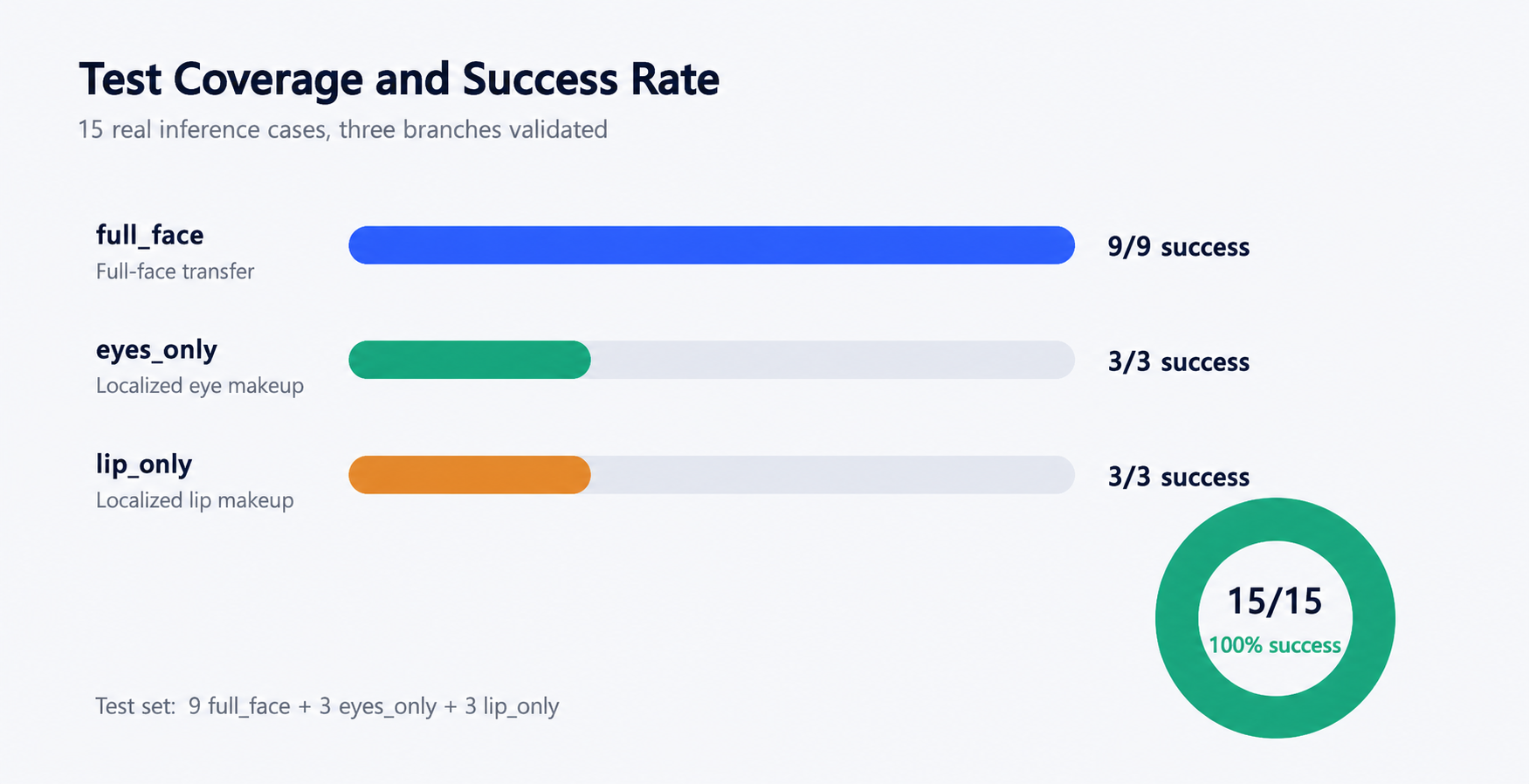
Coverage summary. Test point: confirm that all nine full-face, three eye-only, and three lip-only cases were exercised and completed.
Each evidence panel is intentionally a horizontal row rather than a contact sheet that shrinks every face into a large collage. From left to right, the panels show the source image, source mask, masked reference image, reference mask, and generated result. The panel below is a full-face case, so the two white mask shapes cover the larger facial regions used by that branch.
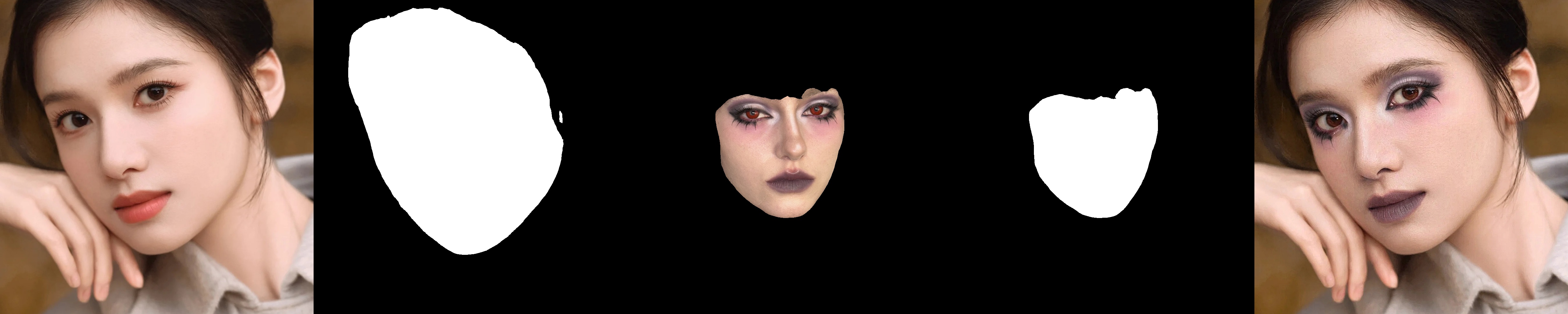
Full-face case 0001→0001. Test point: transfer the complete eye, lip, and face makeup pattern while keeping the source portrait’s framing and identity cues.
The full-face results were the easiest branch to interpret. The reference has a strong, smoky eye and darker lip treatment, and the generated result carries that direction into the source portrait. The transfer is not a pixel copy. The model synthesizes the makeup into the source face, so small contours and color transitions are re-rendered. In a practical review, that matters more than literal texture duplication: a transfer that simply pasted the reference would fail as soon as pose, crop, or facial proportions changed.
I also checked cross-identity pairings rather than relying only on same-index examples.
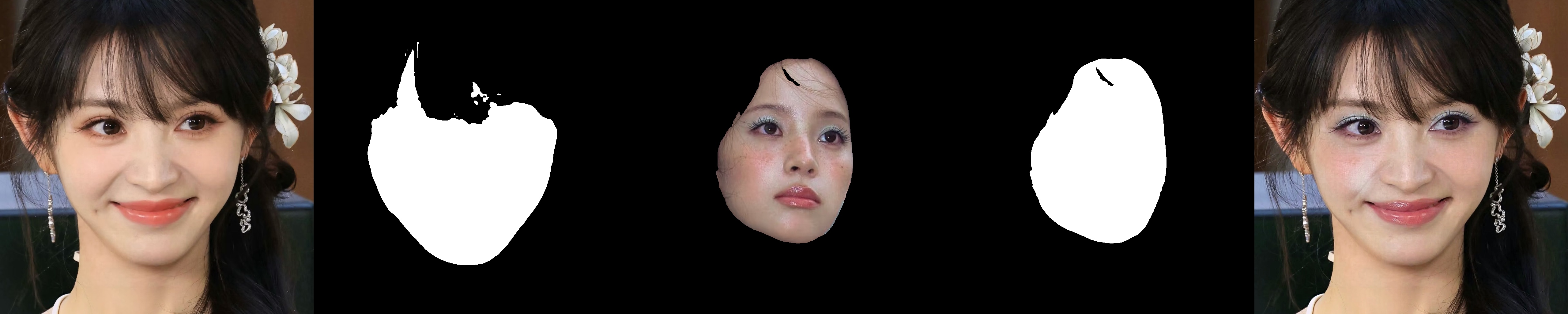
Full-face case 0002→0003. Test point: change the reference makeup while keeping a different source portrait, checking whether the result follows the reference without replacing the source face wholesale.
The remaining six full-face panels complete the 3×3 matrix. I am keeping each panel separate so the source, both mask views, reference material, and result stay readable at normal document width.
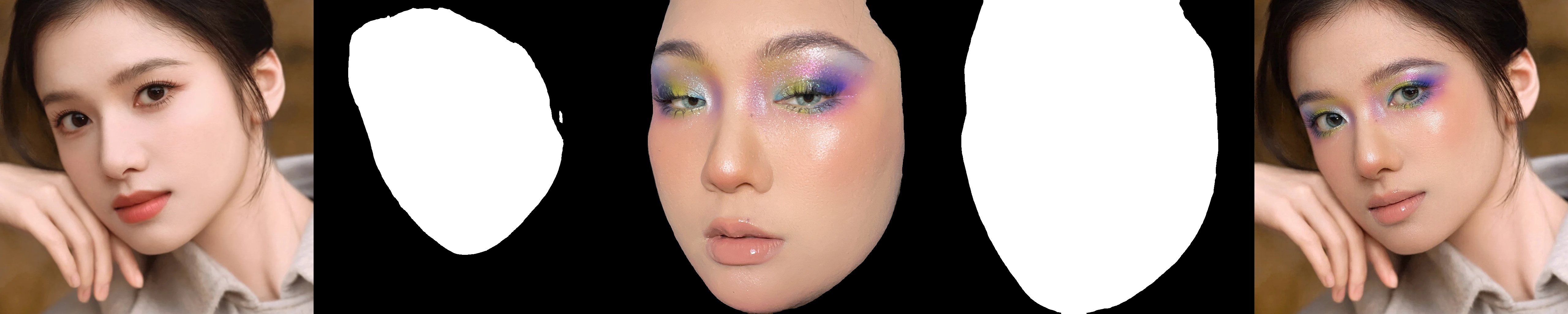
Full-face case 0001→0002. Test point: hold the source portrait constant and change the reference look.
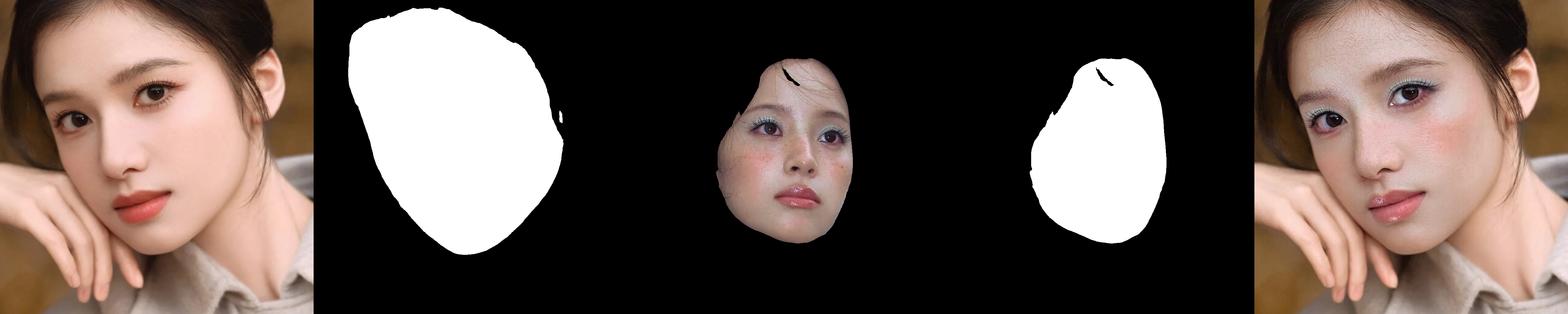
Full-face case 0001→0003. Test point: test a second reference style on the same source to check whether the output follows reference makeup rather than a fixed source bias.
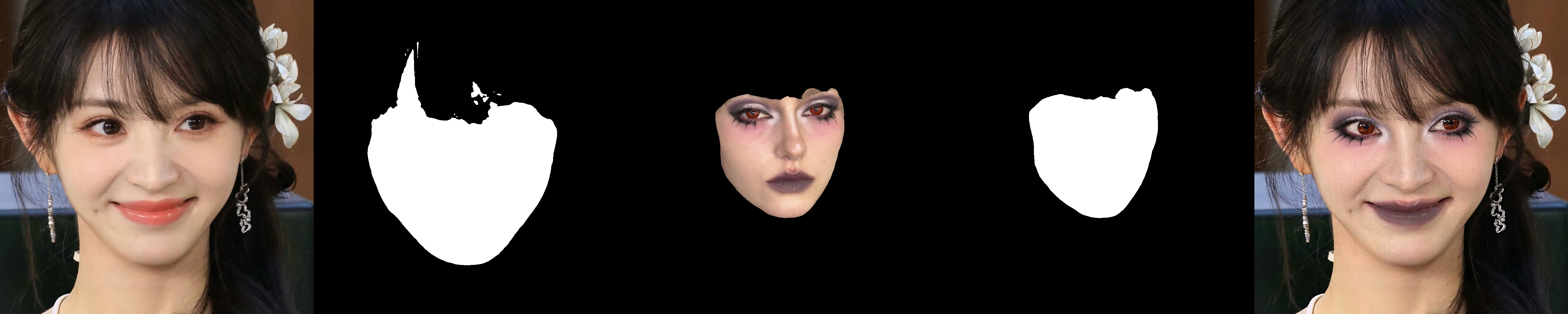
Full-face case 0002→0001. Test point: transfer the first reference look onto a different source portrait.
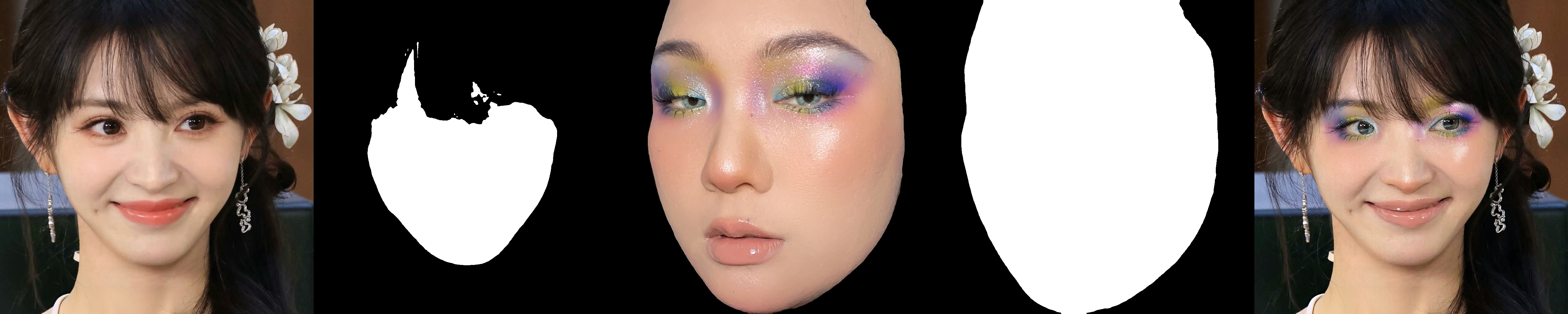
Full-face case 0002→0002. Test point: include a same-index full-face pair as a consistency check.
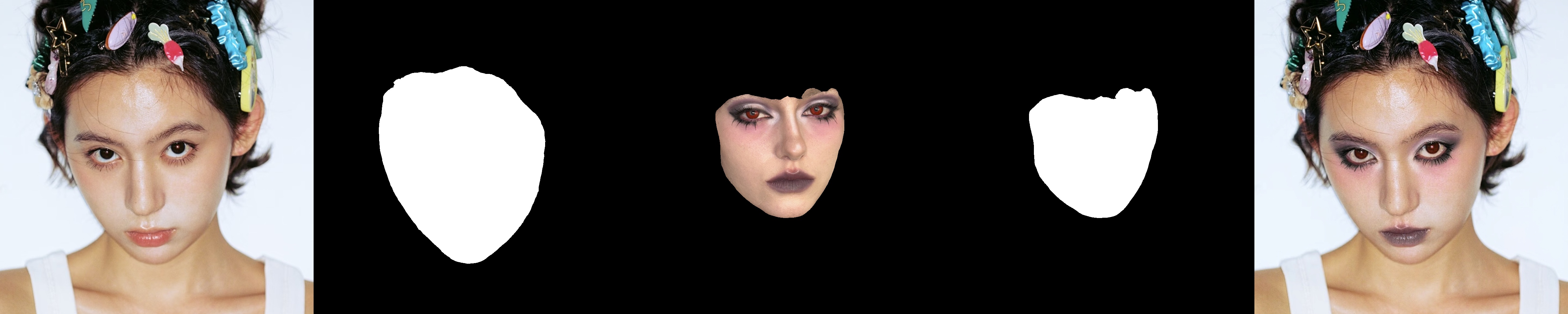
Full-face case 0003→0001. Test point: test whether the source crop remains stable when the reference makeup comes from another portrait.
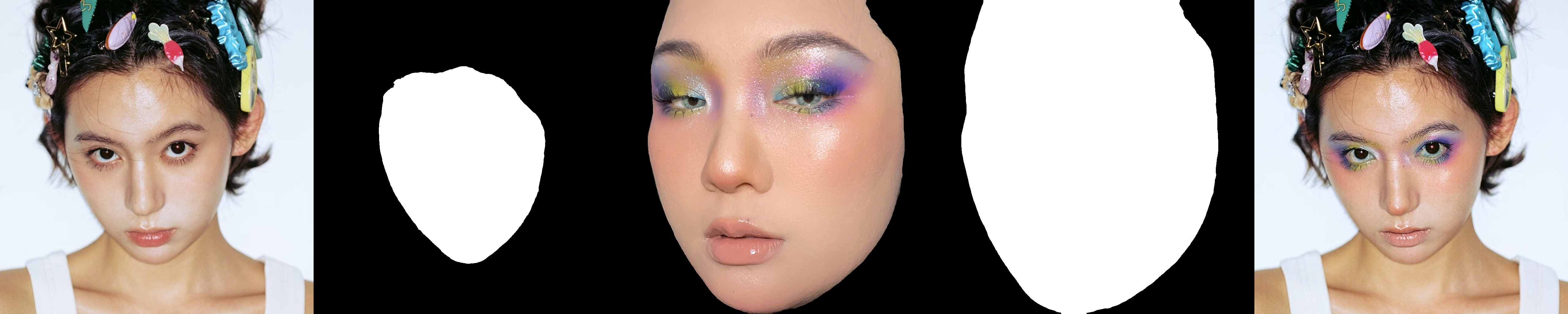
Full-face case 0003→0002. Test point: use the second reference style on the third source and inspect makeup strength and boundary stability.
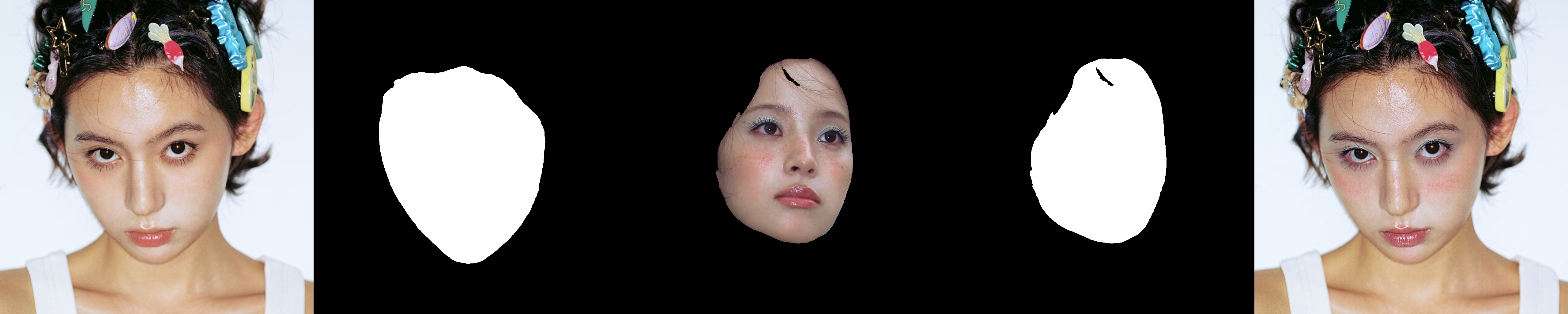
Full-face case 0003→0003. Test point: include the third same-index full-face pair and complete the 3×3 matrix.
Across the nine full-face cases, the source face remained recognizable in the visual panels. The effect was strongest when the reference had clear, high-contrast eye or lip makeup. More subtle source makeup produced a softer difference, which is expected: a model cannot transfer a strong pattern if the reference signal is weak or ambiguous. I did not run a formal face-recognition or identity-similarity metric, so “recognizable” here is a visual observation, not a benchmark score.
The local-mask branch mattered more than I expected
The eye-only and lip-only branches are the most useful part of MagicMakeup’s interface, but they are also where a test harness can fool the reviewer. My first comprehensive record showed label=eyes and label=lip, yet the paths recorded for those jobs pointed to the face-mask directories. The processes completed, but completion alone did not prove that the experiment had tested local control.
I repaired the branch mapping so that:
full-face jobs use the face mask for both source and reference;
eye-only jobs use the eye masks with the
_mask.pngnaming convention and--label eyes;lip-only jobs use the lip masks with the
_mask.pngnaming convention and--label lip.
I then reran the three eye-only and three lip-only cases and retained the corrected panels separately from the stale summary record. This is why the article’s local-branch judgement is based on the fixed panels, not on the old path fields in the first JSON summary.
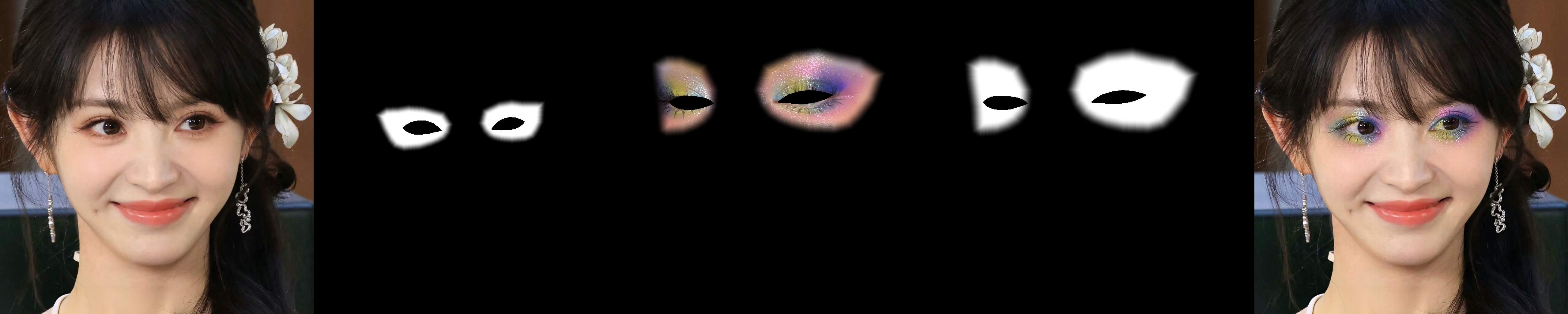
Corrected eye-only case 0002→0002. Test point: only the eye region is selected in both mask columns; the generated result should add the reference eye makeup without intentionally repainting the lips or cheeks.
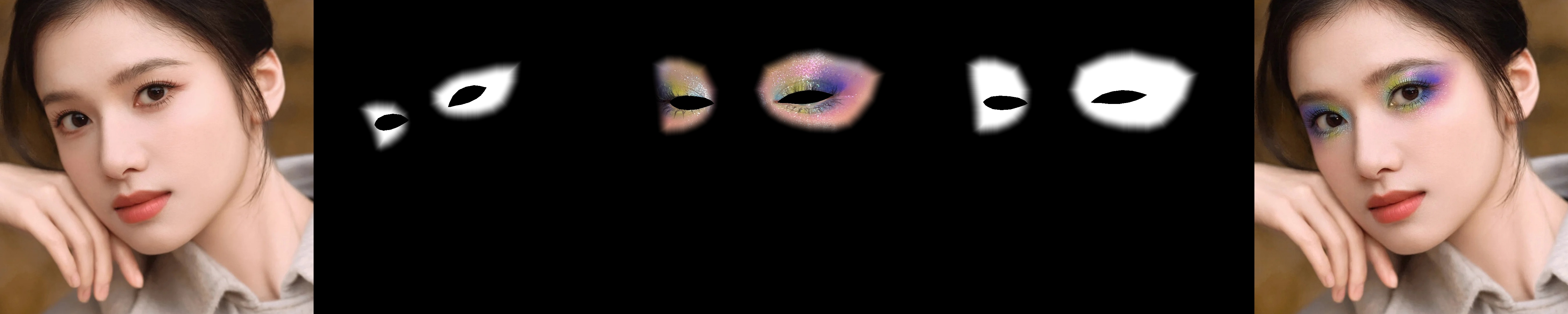
Corrected eye-only case 0001→0002. Test point: keep the reference eye makeup fixed while changing the source portrait, checking regional transfer across source faces.
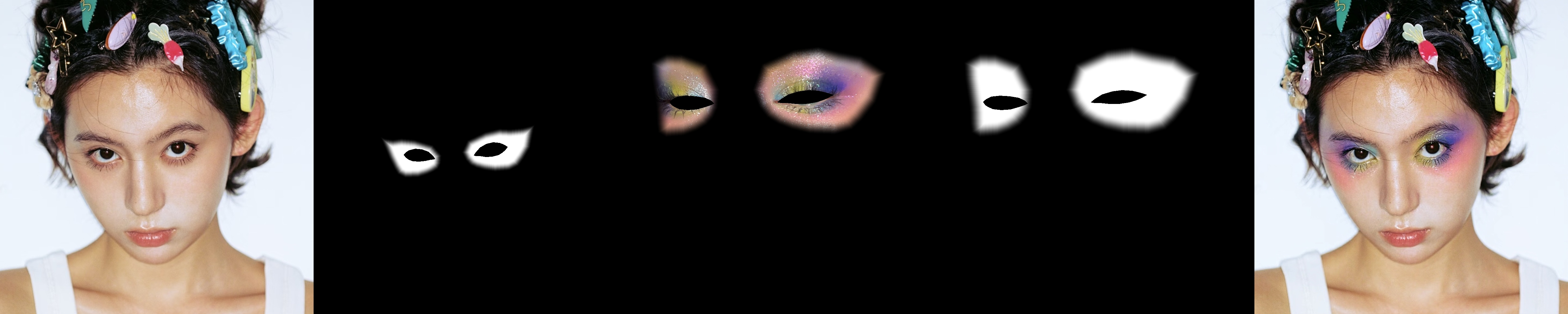
Corrected eye-only case 0003→0002. Test point: test the same eye reference on a third source and inspect whether non-eye regions remain stable.
The corrected eye panel makes the intended experiment visible. The source mask contains two eye-shaped regions, and the reference mask isolates the corresponding eye makeup. The result adds a vivid multicolor eye look while leaving the overall expression, hair, earrings, and background stable enough for visual inspection. Some spill or soft blending at a boundary is normal for a generative edit, but this is materially different from feeding a full-face mask while merely changing the label string.
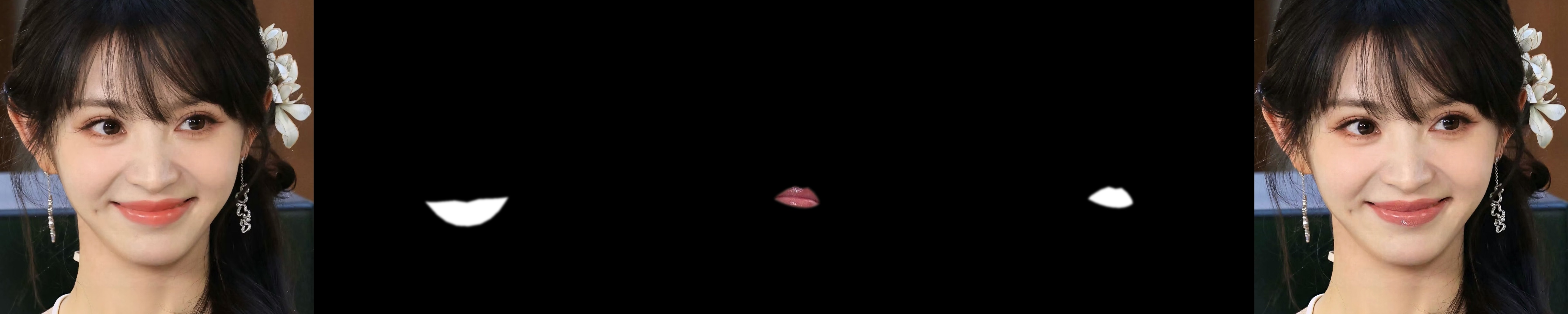
Corrected lip-only case 0002→0003. Test point: the source and reference masks isolate the lips; the result should transfer lip color and finish without deliberately applying the reference eye makeup.
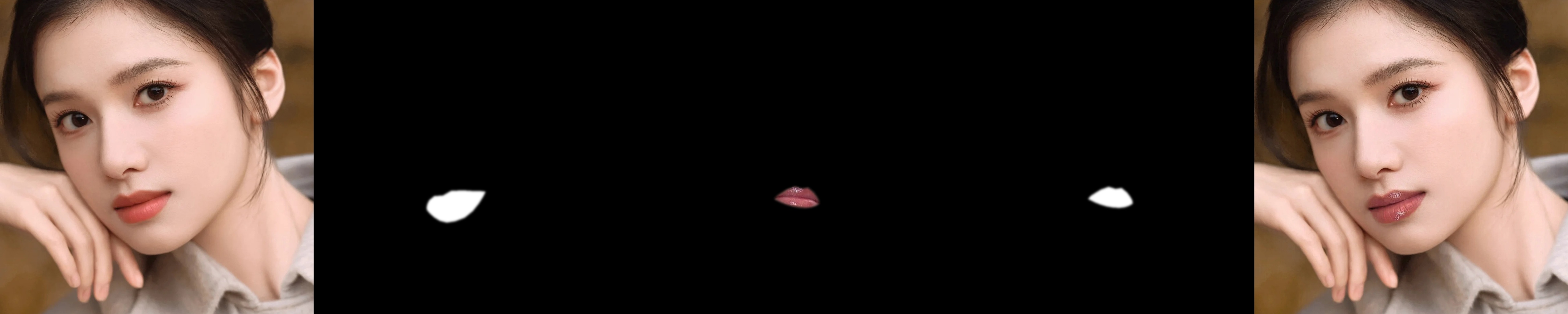
Corrected lip-only case 0001→0003. Test point: hold the lip reference constant and change the source portrait, checking targeted color transfer.
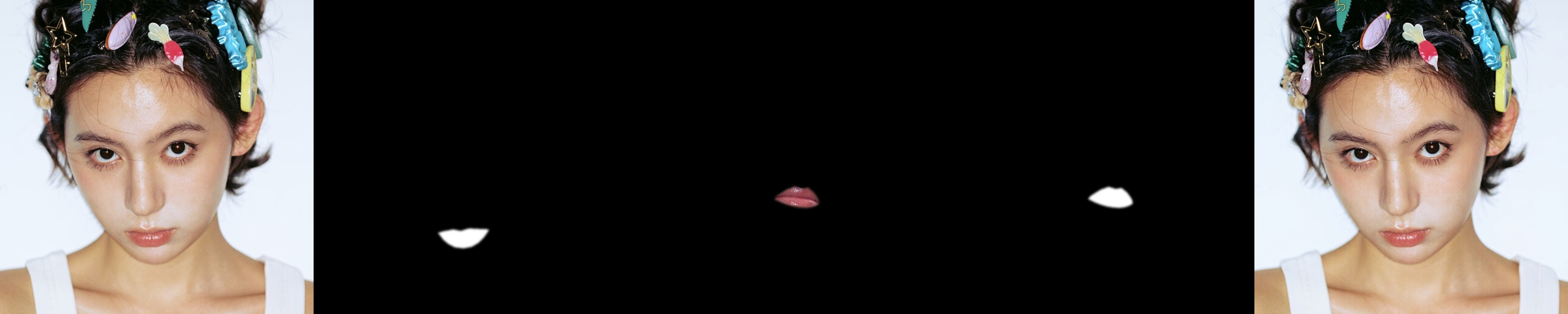
Corrected lip-only case 0003→0003. Test point: include a same-index lip pair and inspect the small target region at full view.
The lip-only branch is a more conservative demonstration. The selected regions are small, so the visual change is less dramatic than in the eye case. That is a strength for targeted editing, but it also means the result needs to be viewed at a useful size. A thumbnail can make a good lip transfer look like no change at all. The corrected panel keeps the input, masks, and result in one row so the test point is inspectable rather than implied.
Performance on the RTX 4090
The deployment was a single-GPU, offline-style command-line evaluation. The measured environment was Ubuntu 22.04 with Python 3.10.12, PyTorch 2.9.1+cu128, CUDA 12.8, Diffusers 0.35.0, Accelerate 1.8.1, Transformers 4.57.3, and PEFT 0.17.0. The GPU exposed 49,140 MiB of memory.
The first model and pipeline load was recorded as 1.442 seconds after the weights were already local. That number excludes model download and should not be read as cold-start time from an empty machine. The fifteen generation jobs used the same 28-step configuration. The measured per-image range was 111.10 to 118.50 seconds, with an average of 111.99 seconds.
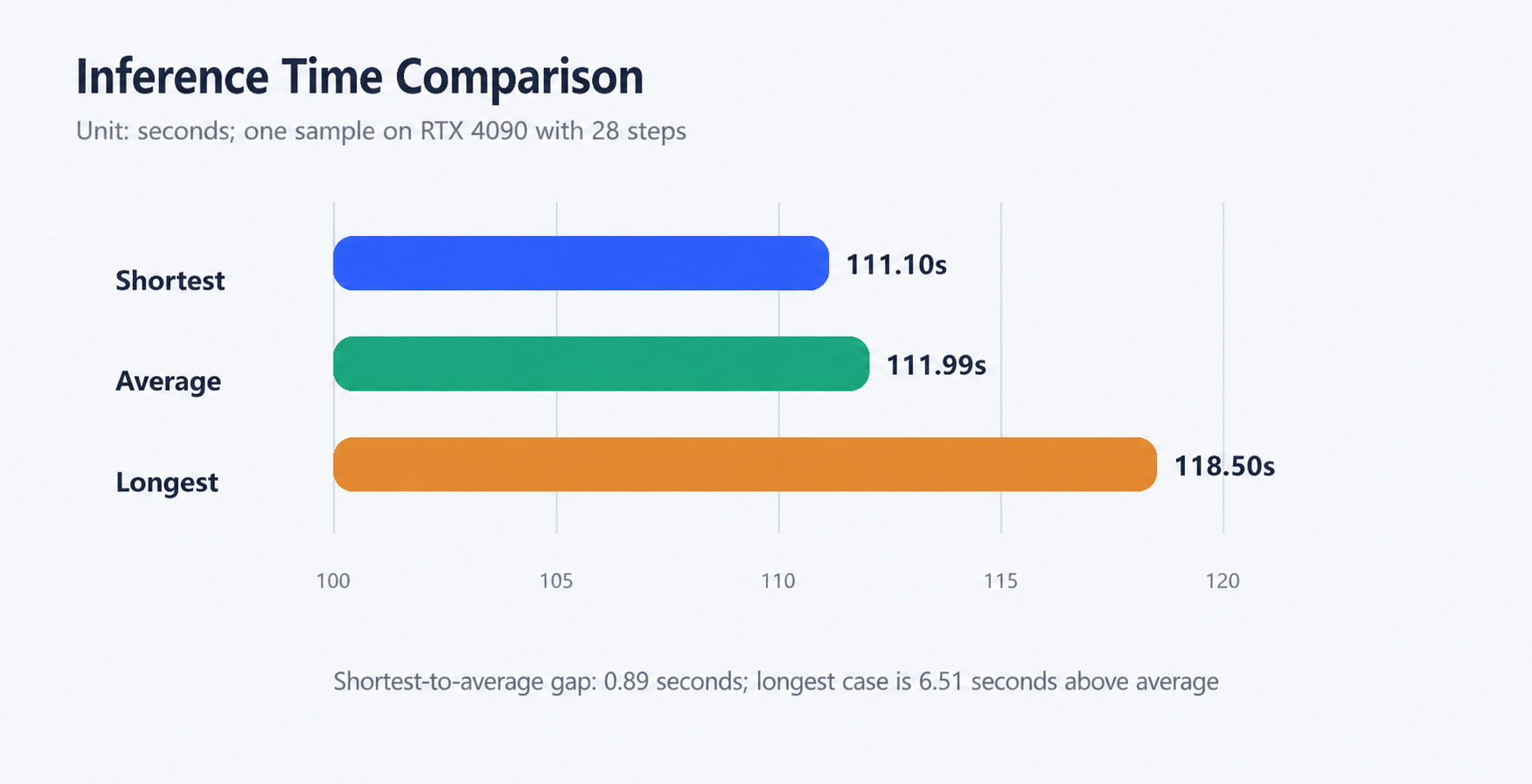
Measured timing for the fifteen-case suite. Test point: establish a repeatable per-image cost at 1024×1024 and 28 steps.
The narrow timing range is useful operationally. The longest case was only 7.40 seconds above the shortest case, and the average was close to the low end. This suggests that the main cost is the fixed diffusion pipeline rather than a particular full-face, eye, or lip label. It also means that a batch of fifteen images is not a quick interactive demo: generation alone is roughly 28 minutes, before queueing, image preparation, or post-processing.
The resource picture is more important than the wall-clock number if the target machine is smaller.
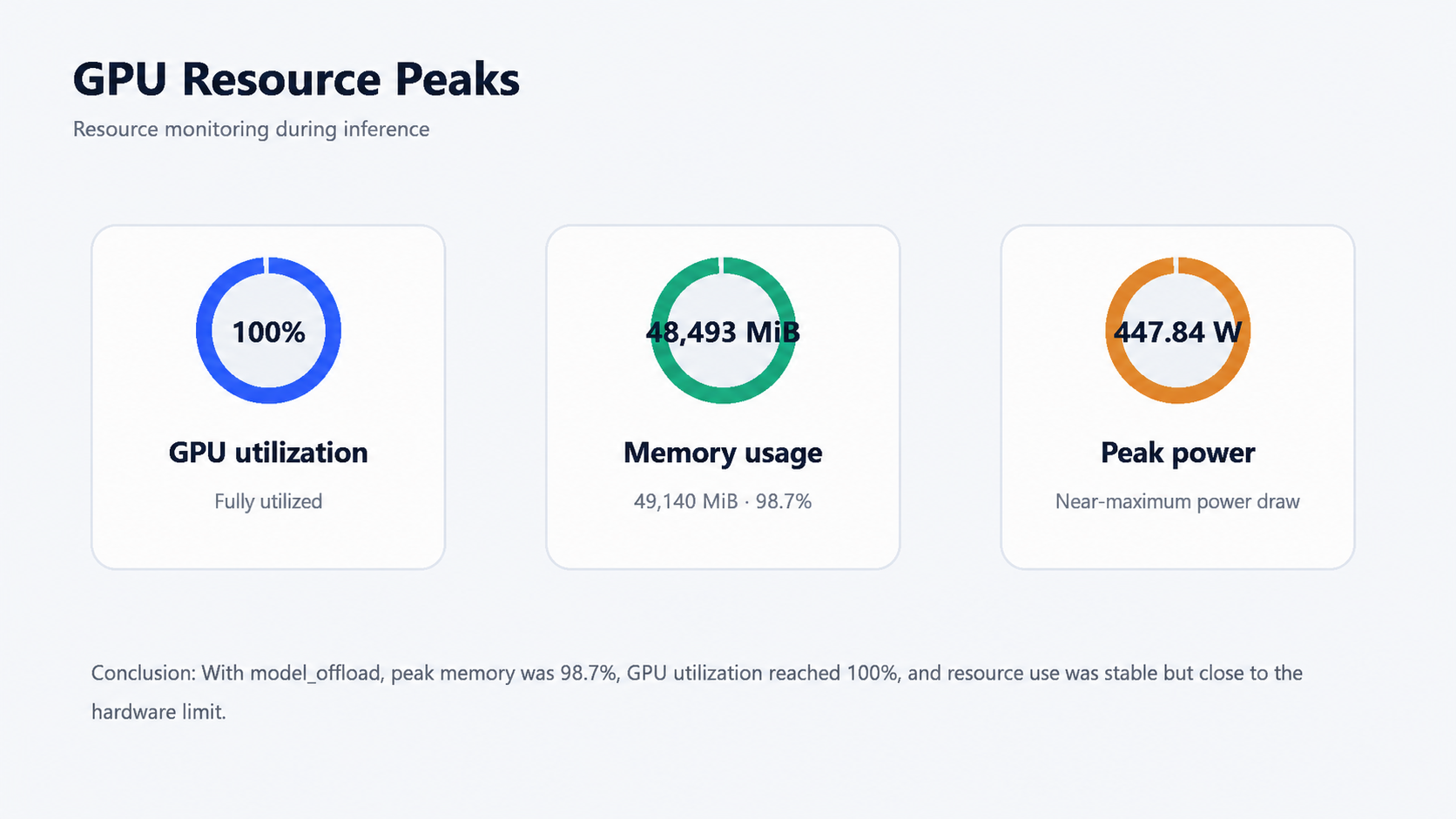
Peak resource observations from the same run. Test point: determine whether a 24 GB-class card is a realistic drop-in target for this exact configuration.
The peak GPU utilization reached 100%. Peak memory reached 48,493 MiB, or approximately 98.7% of the available 49,140 MiB. The recorded peak GPU power was 447.84 W. The process-level PyTorch peak allocation was about 30,378 MiB, with roughly 31,382 MiB reserved; the higher device-level memory observation includes the broader pipeline and runtime footprint. These figures are measured observations, not requirements promised by the paper.
My conclusion is that a 24 GB card should not be assumed to work with the same 1024×1024, model-offload settings. The README’s sequential-offload option may make smaller devices possible, but I did not benchmark that path, so I will not invent a speed or memory number for it. If deployment is intended for a shared service, I would first add a queue, a one-job-at-a-time GPU lock, output cleanup, and explicit memory recovery between jobs. The repository gives an inference script, not a production API server.
What the images say about quality
Full-face transfer
The full-face branch delivers the most obvious visual payoff. It can carry a coordinated eye, lip, and face treatment into a different source portrait. In the tested examples, the generated result retained the source’s crop, pose, hair, and general facial layout rather than simply copying the reference. The best cases were those with a clear reference look and similar portrait scale.
The main weakness is that full-face control is also the least surgical option. If the reference includes an intense blush or a large contour change, the result can modify more of the face than a user wants. The branch is appropriate when the intent is “give this portrait the overall look of the reference,” not “change one cosmetic detail and freeze everything else.”
Repeatability, failure modes, and what I would put around the model
The successful result count is useful only because the test contract was kept stable. For a production-quality evaluation, I would record the random seed, exact image dimensions before resizing, model revision, scheduler settings, mask source, and whether the pipeline was warm or cold. This run fixed the main visible parameters, but it was not designed as a scientific ablation. I did not vary the seed, guidance scale, diffusion steps, crop policy, or offload mode. A different seed can change boundary softness and small makeup details even when the overall look is similar.
I would also separate three kinds of failure that are easy to mix together:
Input-contract failure: the image or mask is missing, has the wrong filename, has the wrong spatial dimensions, or uses a full-face path for a local label.
Runtime failure: the process cannot load a component, runs out of memory, encounters a CUDA or dependency mismatch, or loses access to an offline model directory.
Quality failure: the command completes, but the mask boundary, color transfer, identity preservation, or reference fidelity is not acceptable.
The first class should be caught before GPU work begins. A preflight script can check that source and reference images have compatible dimensions, that every requested branch has both masks, that the mask contains nonzero pixels, and that a local branch is not pointing into face. It can also generate a one-line manifest for each job. This is a better guardrail than reading the label from a log after a two-minute inference has already finished.
The second class needs ordinary service engineering. Because the tested configuration sits close to the device memory ceiling, I would not allow two jobs to enter the pipeline concurrently. I would reserve one model process per GPU, place a bounded queue in front of it, and record the job ID, start time, end time, memory peak, output path, and failure reason. If a process fails during model loading, the service should report a dependency or weight problem rather than silently retrying an identical job until the GPU is wedged. If a generation fails after several completed jobs, the wrapper should be able to recycle the worker and preserve the earlier artifacts.
The third class needs a review protocol, not just a pass/fail flag. For every output I would ask four questions: does the source person remain identifiable as the same source portrait; did the changed region receive the intended reference style; did pixels outside the target region remain acceptably stable; and are the transition boundaries natural at 100% view? The five-column panels used in this review are helpful because they make the second and third questions inspectable. A result-only folder is much harder to audit later.
Mask preparation deserves its own place in the pipeline. The official repository provides commands for generating eye and lip masks, but automatic masks are not automatically correct for every crop, expression, or lighting condition. I would keep the original mask, a normalized binary mask, and a preview overlay for each job. When a test fails visually, the first debugging question should be “what region did the model receive?” rather than “is the model bad?” The stale full-face paths in my first local summary are a concrete example of why this distinction matters.
There is also a difference between a research demo and a usable batch product. The demo answers whether the model can execute an edit. A batch product must answer whether the same request can be reproduced a week later, whether a missing reference image is reported clearly, whether a user can cancel a queued job, and whether generated outputs are retained or deleted according to policy. MagicMakeup gives a useful core inference entry point, but those surrounding decisions remain outside the repository.
For a fair second round, I would expand the suite in four directions. First, I would add more head poses, glasses, occlusions, darker and lighter lighting, and different makeup intensities. Second, I would repeat each input with several fixed seeds to measure variance instead of treating one output as the model’s single personality. Third, I would run a formal identity-preservation metric and a masked-region similarity metric, while keeping human review for boundary artifacts. Fourth, I would benchmark model offload and sequential offload separately on the same GPU. The present test is enough to establish that the pipeline works and to expose the mask-path pitfall; it is not enough to claim universal robustness.
This distinction changes my deployment recommendation. For a research notebook or a curated offline queue, the current evidence is sufficient to justify further use. For a customer-facing editor, I would require a larger regression set, consent handling, output moderation, and a clear fallback when a mask is uncertain. For an interactive UI, I would also require a lower-latency mode or a preview strategy, because two minutes per 1024×1024 result is too slow for a normal edit-and-compare loop.
Eye-only transfer
Eye-only transfer is the strongest demonstration of regional control in my set. The output can add a dramatic shadow or liner pattern while keeping the lips and much of the surrounding portrait close to the source. The method is especially useful for comparing several eye styles against one source image.
The quality depends on mask quality. A mask that clips the eyelid too tightly can cut off the intended shadow; a mask that includes too much brow or cheek area can invite unwanted changes. In other words, the local branch does not remove the need for image preparation. It makes the preparation more explicit and more valuable.
Lip-only transfer
Lip-only transfer is visually subtle but operationally important. It is the right branch for catalog-like variations where the eyes, skin, hair, and lighting should remain stable. The result can be harder to judge at a glance because a small target region carries less total pixel change. I recommend showing the source, both masks, the masked reference, and the result together whenever the result is reviewed by someone else.
The repaired cases also answer a question that often gets lost in model demos: which local makeup migration actually used a local mask? In this test, cases 10–12 used eye masks after repair, and cases 13–15 used lip masks after repair. The first summary’s labels were not enough evidence by themselves.
Setup experience and reproducibility
The official README is relatively direct: clone the repository, install the listed dependencies, download FLUX.1-Kontext-dev and the MagicMakeup checkpoint, prepare the example directory, and run test_single.py. The command-line interface exposes the labels and the offload modes clearly. That is a good baseline for research reproduction.
The practical setup was less frictionless than the README suggests. The pipeline imported IPython debugging support indirectly, so the isolated environment needed several small IPython support packages before the test runner could start. I also prepared the SigLIP component locally because relying on a live model download during each test made the run less deterministic. These are ordinary environment issues, not changes to the model method, but they are worth documenting because a clean machine can fail before the first image is generated.
For a fresh machine, I would use an isolated uv environment and keep every model directory explicit. The tested numbers above came from an already prepared isolated environment; the following is a clean reproducibility template rather than a claim that the original run used these exact installation commands.
Clean setup template
git clone https://github.com/vivoCameraResearch/Magic-Makeup.git
cd Magic-Makeup

uv venv --python 3.10
source .venv/bin/activate

# Choose the PyTorch wheel that matches the installed NVIDIA driver.
uv pip install torch torchvision torchaudio
uv pip install -r requirements.txt

# The runner may need these IPython support packages in a minimal environment.
uv pip install ipdb traitlets stack-data executing asttokens pure-eval prompt-toolkit wcwidth
The official model references are:
huggingface-cli login
huggingface-cli download black-forest-labs/FLUX.1-Kontext-dev \
  --local-dir /path/to/FLUX.1-Kontext-dev
huggingface-cli download Anyou/MagicMakeup \
  --local-dir /path/to/MagicMakeup-checkpoint
huggingface-cli download google/siglip-so400m-patch14-384 \
  --local-dir /path/to/siglip-so400m-patch14-384
The exact model access permissions and storage size can change, so I would verify each local directory before starting the pipeline. I would also keep the download credentials outside the article, shell history where possible, and source tree.
A full-face run follows the official argument pattern:
SIGLIP_MODEL_PATH=/path/to/siglip-so400m-patch14-384 \
HF_HUB_OFFLINE=1 TRANSFORMERS_OFFLINE=1 \
python test_single.py \
  --model_path /path/to/FLUX.1-Kontext-dev \
  --lora_path /path/to/MagicMakeup-checkpoint \
  --source_image example/source/image/0001.png \
  --source_mask example/source/mask/face/0001.png \
  --reference_image example/makeup/image/0001.png \
  --reference_mask example/makeup/mask/face/0001.png \
  --label eyes,lip,face \
  --output_path outputs/full-face-0001-0001.jpg
For an eye-only run, change both mask directories to eyes, use the filenames with the _mask.png suffix, and set --label eyes. For a lip-only run, use the corresponding lip mask directories and set --label lip. I would add a preflight assertion that the branch label and mask directory agree. That one check would have caught the stale path issue in my first comprehensive record.
MagicMakeup compared with nearby approaches
There is no honest way to give a head-to-head image-quality score against every related model without running the same images, seed policy, resolution, and masks through each system. I did not do that here. The comparison below is about documented design and the practical trade-offs exposed by my run.
Model or approach | Public positioning | Practical difference from my MagicMakeup run |
|---|---|---|
MagicMakeup | Region-controllable diffusion transformer built on FLUX.1-Kontext-dev; full-face, eyes, and lip labels; MakeupHQ Bench | Strong regional workflow and clear mask contract, but heavy 1024×1024 offline inference |
Stable-Makeup | Earlier diffusion-based makeup transfer with a dedicated makeup encoder and structure/content controls | More established in the Stable Diffusion-era ecosystem; its control vocabulary and runtime assumptions are different, so results are not directly interchangeable |
FLUX-Makeup | FLUX-Kontext-based makeup transfer with a reference-driven workflow and RefLoRAInjector | Close in generation family and potentially attractive for a simpler source/reference workflow; my test did not measure it against MagicMakeup |
Nano Banana 2 (Gemini 3.1 Flash Image) | Google’s multimodal image generation and editing model for high-quality conversational editing, low latency, multiple-reference consistency, and up to 4K output | Easier to use and better suited to natural-language iteration; it does not expose the same explicit local |
Stable-Makeup is a useful reference point because its paper appeared in 2024 and frames makeup transfer around a dedicated makeup representation and structure/content controls. MagicMakeup’s newer contribution is not simply “more makeup.” It makes regional labels and masks central to the interface and packages the work around a newer FLUX-Kontext-based transformer.
FLUX-Makeup is the closer conceptual neighbor because it also builds on the FLUX-Kontext line. Its public model description emphasizes a source-plus-reference workflow and a RefLoRAInjector design. If I were choosing a second model to benchmark, I would test it with the same nine full-face and six local cases, then compare identity preservation, boundary spill, reference-style strength, latency, and peak memory. I would not infer those outcomes from model names alone.
MagicMakeup versus Nano Banana 2
Nano Banana 2 is a different kind of competitor. Google’s official developer page identifies it as Gemini 3.1 Flash Image, model code gemini-3.1-flash-image, and positions it as a versatile generalist for high-quality generation, conversational editing, low latency, multiple-reference consistency, and up to 4K output. Google’s official image-generation guide also describes it as a general-purpose choice balancing intelligence, cost, and latency for developer workflows. In practice, the user describes an edit in natural language and sends images into a Gemini workflow; MagicMakeup starts from a more explicit research interface with source/reference masks and a region label.
For a makeup editor, Nano Banana 2 is the easier first try. I could ask for “soft rose eye shadow but keep the face and background unchanged” in conversational language, iterate, and let the model reason about the image context. It can also be a better fit when the workflow needs several reference images, different aspect ratios, or a larger final output. That is attractive for a designer or end user who does not want to create binary eye and lip masks. Its official positioning is centered on speed and efficient visual creation, whereas my local MagicMakeup run took about 112 seconds per 1024×1024 result and nearly filled a 49 GB GPU.
MagicMakeup is stronger when the target region must be part of the reproducible input contract. In my corrected test, cases 10–12 used eye masks and cases 13–15 used lip masks. The five-column panels make that fact auditable. A natural-language edit can be very precise, but the prompt itself does not provide the same file-level proof that a particular mask was used. This is not a claim that Nano Banana 2 cannot make a local edit; it is a difference in control surface and auditability.
The trade-off is deployment ownership. Nano Banana 2 is convenient through Google’s Gemini products and developer surfaces, but the comparison is against a hosted service workflow. MagicMakeup requires local weights, a large GPU, dependency management, and mask preparation, but the tested pipeline can be kept within a local offline environment. For privacy-sensitive portrait processing or a research regression suite, that distinction can matter more than a single visual preference.
I did not send these same fifteen cases to Nano Banana 2, so I am not assigning it a measured quality score or claiming that one model wins on identity preservation. The fair next experiment would use the same source and reference images, describe the same target region in a fixed prompt template, and compare output quality, boundary spill, identity consistency, latency, cost, output resolution, and data-handling requirements. This comparison refers specifically to Nano Banana 2 / Gemini 3.1 Flash Image, not the legacy Nano Banana, Nano Banana 2 Lite, or Nano Banana Pro.
For a research team, MagicMakeup is attractive when the mask is part of the product requirement. For a quick creative prototype, a model with a simpler input contract may be easier to integrate. For a production system, neither paper-level claim nor a successful CLI run replaces a service wrapper, queue design, consent policy, and regression set.
Scorecard
These are practical scores from this deployment, not official benchmark numbers:
Area | Score | Reason |
|---|---|---|
Regional control | 4.5/5 | Eye and lip branches are explicit and worked after mask-path correction |
Full-face visual quality | 4/5 | Strong coordinated transfer in the supplied portraits; no formal quality metric run |
Identity and structure | 4/5 | Source portraits remained visually recognizable in the panels; this is qualitative |
Setup experience | 3/5 | Documentation is usable, but weights, masks, SigLIP, and dependency details take work |
Speed | 3/5 | Stable at about 112 seconds per image, but far from interactive |
Reproducibility | 4/5 | Official CLI and folder conventions are clear once the mask contract is checked |
Overall fit | 4/5 | A strong offline research tool, not a turnkey consumer service |
Limitations and responsible use
This review has several deliberate limits. It uses one 4090-class GPU, one fixed example set, one main resolution, one guidance scale, and one step count. It does not report a formal identity metric, perceptual similarity score, human preference study, or comparison run against Stable-Makeup or FLUX-Makeup. The visual conclusions are grounded in the saved panels, while the runtime and resource conclusions are grounded in the recorded job and GPU samples.
The project’s own ethical notes matter here. The official repository says the release is intended for non-commercial academic research and is not for identity recognition, face swapping, impersonation, or deceptive manipulation. Real-face examples should be used with consent. A technically convincing makeup transfer can still be inappropriate if the source image or reference image is used without permission.
Final verdict
MagicMakeup is one of the more compelling open research implementations I have tested for controlled makeup transfer because it treats regional masks as a first-class part of the workflow. The corrected eye and lip cases are more informative than a single polished full-face demo: they show what the model is actually being asked to change. The project also gives enough command-line structure to make a research reproduction possible.
The trade-off is clear. This is a 1024×1024 diffusion-transformer pipeline that nearly fills a 49 GB GPU and takes about two minutes per image on an RTX 4090. Its strengths appear in offline, curated, identity-preserving edits; its weaknesses appear in setup complexity, lack of a production API, and sensitivity to mask preparation. If those constraints fit the project, I would recommend deploying it. If the requirement is real-time preview, low-VRAM inference, or a ready-to-share web endpoint, I would treat MagicMakeup as a model component that still needs engineering around it.
Sources
The images and performance charts in this article are local artifacts from the fifteen-case deployment and evaluation described above. They are not screenshots copied from the project page.